lynes loyalty | DocumentationπŸ–₯️ DashboardπŸ–₯️ Dashboard (opens in a new tab)Website β†—Website β†— (opens in a new tab)
(opens in a new tab)
  • πŸ‘‹ Introduction
  • πŸ‘€ Cheat Sheet
    • JWT Authentication
    • Get your API secret
    • Refresh your API secret
  • πŸ“ Projects
    • Create a new project
    • Create User | Lynes Loyalty API
    • Delete User | Lynes Loyalty API
    • Get User Points | Lynes Loyalty API
  • πŸ“² Events
    • Create your first event
    • Send an event to our API
      • Get User History | Lynes Loyalty API
  • πŸ’³ Loyalty
  • πŸ‘₯ User Groups
    • Create a user group via API
  • πŸ’ͺ Challenges
    • User Challenges
  • πŸ† Leaderboards
    • Get Complete Leaderboard
    • Get User Rank
    • Get User Leaderboard View
  • πŸ”₯ Streaks
    • Overview
    • Partner Checklist
    • Quick Start
    • Integration Guide
    • URL Parameters & Routes
    • Authentication
    • Native Bridge (Callbacks)
  • About Our Event-Driven Gamification Platform | Lynes Loyalty
  • API Reference | Lynes Loyalty API
    • Events & Analytics API Reference | Lynes Loyalty API
    • Leaderboard API Reference | Lynes Loyalty API
    • Offers & Shops API Reference | Lynes Loyalty API
    • User & Loyalty API Reference | Lynes Loyalty API
    • User Groups API Reference | Lynes Loyalty API
πŸ” Authentication
Refresh your API secret

Refresh your secret

If your secret is compromised, you can refresh your token by going to the dashboard -> settings and clicking on "Refresh." Please note that the old token becomes invalid immediately after refreshing. Any requests made with the old token will stop working.
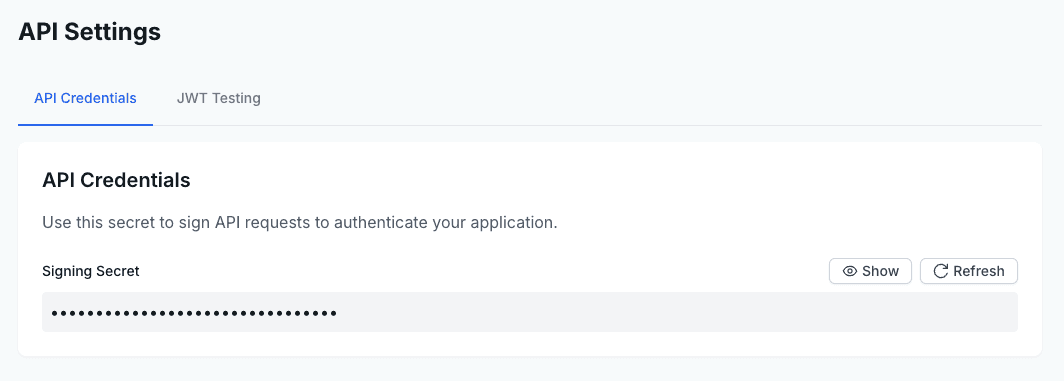
Show Secret Button
Get your API secretπŸ“ Projects

lynes loyalty | Documentation